Going to Fosdem 2010

FOSDEM, the Free and Open Source Software Developers' European MeetingIt’s finally there. The 10th edition of Fosdem.
For the people whom don’t know Fosdem (yet):It’s the finest free and non-commercial event where FOSS developers and communities can meet.There are a lot of interesting talks and demo’s, food, drinks, booths, and if you search good enough you might encounter a (real) girl.
And the best thing… it’s in Belgium :) Here’s a list of talks I’d like to attend

Saturday

  • 11:45 to 12:30 Evil On the Internet

    This talk will show you live examples of these sites, explain how they work, and tell you what we currently know about the criminals who operate them.
    There’s a lot of evil things on the Internet if you know where to look for them. Phishing websites collect banking credentials; mule recruitment websites entice people into money laundering; fake escrow sites defraud the winners of online auctions; fake banks hold the cash for fake African dictators; and there are even Ponzi scheme websites where (almost) everyone knows that they’re a scam. This talk will show you live examples of these sites, explain how they work, and tell you what we currently know about the criminals who operate them.

  • 13:15 to 13:45 Mozilla Europe

    General Introduction followed by an update on the work of Mozilla in Europe.

  • 13:45 to 14:00 Mozilla Foundation

    Latest MoFo news and projects.

  • 15:30 to 16:30 HTML5
  • Read the rest of this entry »

New screen

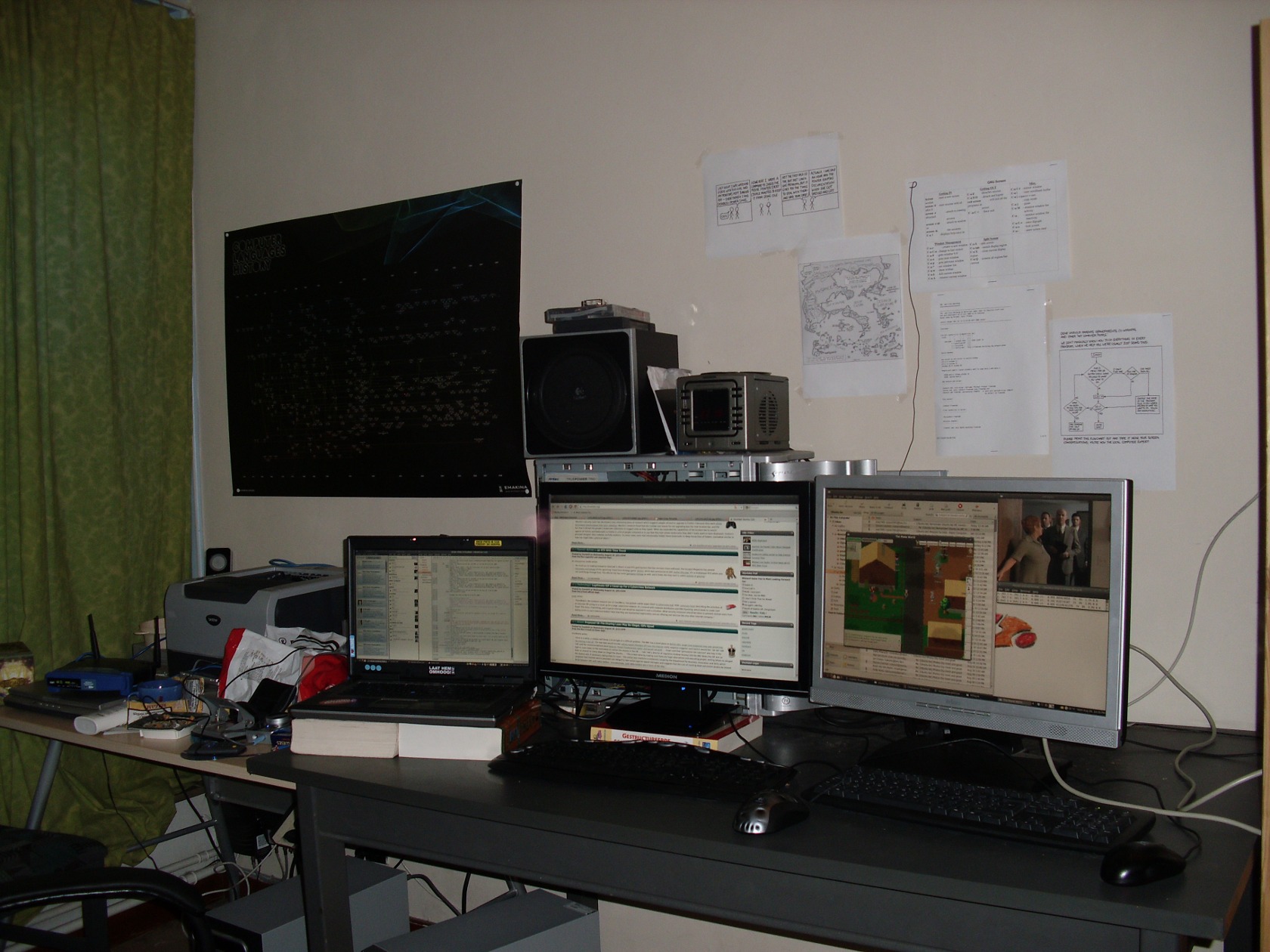
Today, I bought my second 22″ Widescreen (Medion) monitor for only €150.
With its maximum resolution of 1680×1050, contrast of 1000:1 and a 5 ms reaction speed, it makes just a simple yet perfect addition to my desk.
This is one of the devices that just does the trick.
If I had spend 35 Euro more, I could have bought a Full-HD 23″ monitor from samsung… but I just can’t find a purpose for the Full-HD function and the 23″ would denigrate my other (also a 22″) screen.
It’s main purpose will be browsing, coding and a little bit gaming or designing.

I’m proud to present, my new screen (middle) functioning as a second screen for my portable (Dell Latitude D820).

DSCI1724_thumb

I had to disable Compis Fusion on my laptop so that I could disable screen monitoring on the dual-head.

Ubuntu Server on VirtualBox returns error This kernel requires the following features not present on the cpu: 0:6

I installed Ubuntu Server 8.04 inside a VirtualBox (v 2.4.1_OSE) virtual machine.
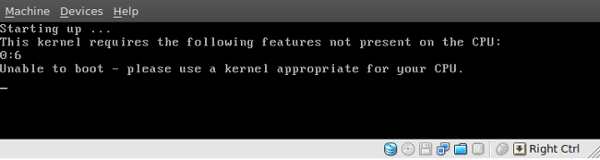
The installation went smooth, but when I wanted to boot into my Ubuntu Server, it returned the following error right after GRUB:

This kernel requires the following features not present on the cpu: 0:6
Unable to boot – please use a kernel appropriate for your CPU

Screenshot or it didn’t happen?

Ubuntu Server on VirtualBox returns error

How to solve:

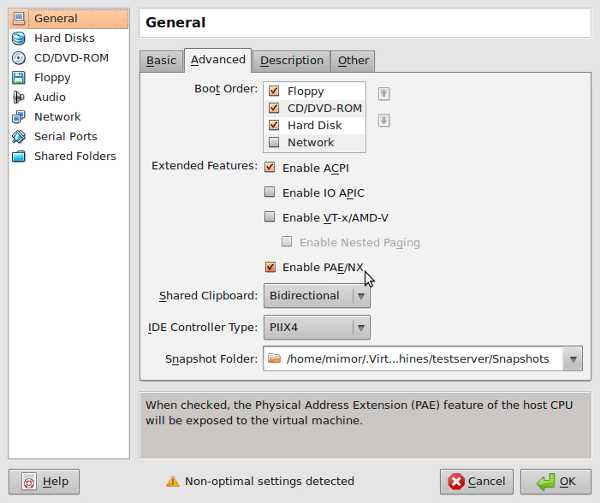
This can be easily resolved by enabling the PAE/NX option in the virtual machine’s settings.
This will expose the PAE of your CPU to the virtual machine.

Just:

  1. go to the homescreen of Virtualbox
  2. select your virtual machine
  3. click the ’settings’ button on top of the screen
  4. click the tab ‘Advanced’
  5. check the box next to ‘PAE/NX’

Like in this screenshot:

Screenshot-testserver - Settings-1

Now, you can fire up your virtual machine again, and it will start up without this error.

Language ‘problems’ inside an Ubuntu LUG

belgiumAs you may know, Belgium has 3 native languages: French, German and Dutch.
Lately, people tend to make a big fuzz about this.
Political party’s started creating diversity based on these languages to use this in their own advantage (votes).
The media has added its share to this too.

I personally don’t mind all these easy and low ways of getting attention.
But now the discussion has appeared as a burden inside our Ubuntu-be LUG as well.

Read the rest of this entry »

Ubuntu-be update

Due to inactivity the last month on the Ubuntu-be mailing list, I had some catching up to do on the huge list of unread mails.
Amongst them I found this mail from  Pierre Buyle:

Hi,

for those requesting a Forum for Ubuntu-be, there is an alternative
solution (which has already been discussed in the past). Gmane
provides two web interfaces for our mailing list. A blog-like one at
http://blog.gmane.org/gmane.linux.ubuntu.region.belgium and a threaded
one at http://news.gmane.org/gmane.linux.ubuntu.region.belgium.

In addition, I registered the mailing list for archiving on Nabble
which also provides an forum like web interface at
http://n2.nabble.com/Ubuntu-be-f3354669.html

These three interface allow one to follow activities on the mailing
list without dealing with it as a bunch of mail. Both Gmane and Nabble
allow posting to the list through the Web interface (only for
subscribed user registered there).

So, if you’re interested in following the Ubuntu-be mailing list, you can easily do so without the ‘hassle’ of subscribing to it.
It’s also a perfect way to check it out for a while, as you don’t receive all these mails in your mailbox.

I have to say, it’s the first time I’ve seen the integrated nabble forum in action, and have to agree that it’s awesome.
Also the blog-styled layout of gmane is making the mailing list (more) enjoyable to read.

Of course, you can also just send a mail to the ubuntu-be mailing list.
Warning: This is a public medium! If you want to send messages to this list you’ll have to register first through https://lists.ubuntu.com/mailman/listinfo/ubuntu-be. Keep into consideration that every message posted will be visible in the public archives!

Release-Party

I’m organizing a release-party for the Ubuntu-be community @Curieuze Neuze in Ghent.
So far it’s not yet confirmed to go on :(
I’ve got a meeting with Philip (the owner) next Saturday 25/04 to ask him if we can get it happen there, and exchange our expectations.
So far it has been announced on the ubunu-be mailing list, and discussed on #ubuntu-be (freenode).

Interested people can still vote for a date on doodle. Read the rest of this entry »

Guildwars on Ubuntu 9.04

As I was dazzled by how easy it was to install Guildwars on a Ubuntu 8.10, I think it’s worth noting that it is as easy on Ubuntu 9.04.

  • First off, you’ll need to have wine installed. If you don’t, fire up a terminal and hit sudo apt-get install wine
  • Then enter your CD.
  • The computer will note the autorun content on the disc and asks you what to do with it.
    By default, there should be the option to execute it using wine.
  • Hit the OK button.
  • Let it install, and you’re ready to play.

If you don’t have the cd’s you can always follow Christer Edwards’s blogpost.

Jaunty in less than 22 hours!

Less than 22 hours left till the Jaunty (Ubuntu 9.04) release.
If you still don’t know what’s the big deal you should check out the Technical Overview page.
My personal favorites:

  • upgraded gnome-display-properties (better support for dualscreen)
  • faster boottime
  • cloud computing support
  • a neat theme called "New Wave" (The softpedia theme article)