Archive for the 'tip' Category

Sorting images according to their width and height

I wrote a script to sort images according to their width and height.
I found myself in need of such a thing after my previous post on how to download 4chan images automatically.
I used this script a few times to get all the wallpapers on the /wg/ board.

After a few GB of images, nautilus starts to get a headache when opening the containing folder.
So I needed to split it up in different folders.
So here’s the script that does it.

There still seems to be a problem with character escaping when the filename contains a ” – ” in it’s title.
But I’m too tired to figure it out now.

Whitespace opening soon in Ghent!

Just got read this mail on the Ubuntu-be mailinglist and thought it would be a nice idea to post it here too :)

A bit off topic for this list, but there are a lot of ubuntu/fos-users
in the space,
so I assumed this can be interesting for ubuntu users.

Whitespace would like to invite you to its opening weekend 19-21 March.

When: From Friday 19th of March to Sunday the 21st.

Where: Blekerijstraat 75, Gent, Belgium

Whitespace is the first hackerspace in Ghent and will be opening its doors
for the first time on the weekend of 19-21 March. The space is ready for
launch, but far from finished: we’ve got a roof, multiple walls,  and some
cat5 and now we need more people to have fun with.

Don’t know what a “hackerspace” is? Check http://hackerspaces.org ;-)

We hope to see you drop by.

The (dynamic) agenda[0]:
————————————

Friday:
20:00: Opening drink, see the space, meet the locals, fun hacker partygames.

Saturday:
14:00 : OpenWRT presentation: a big os for small devices.
15:00 : Flashing for fun & profit:
1 Bring your compatible wireless router[1]
2 Flash it! (don’t worry we’ll walk you trough).
3 …
4 Profit!
17:00 : Everything you always wanted to know about IPv6 but were afraid to ask.
18:00 : Open recipe burgers (with secret sauce).
21:00 : Evening entertainment: Powerpoint karaoke hosted by fs111.
After that : something involving liquids.

Sunday:
12:00 Hungry-Hacker is hungry. Breakfast.
15:00 lightning talks:
Such diverse subjects as: Google summer of code, The talk too trollish to
mention, How to get  yourself a lot of work that you didn’t plan by being
creative, Something about something, Awesome talk will be awesome, …
(open stage, schedule will be on the wiki, add your lightning talk there)

Registration:
Is not necessary but it would be nice to give us an idea on how many of you
to expect so we have enough chairs and secret sauce.
Please add your name: http://www.doodle.com/bg5x7xrbcg5z9h8q
Feel free to invite your friends.

[0] Keep an eye on http://0×20.be/ for the latest agenda updates,
and maybe follow the bird on http://twitter.com/HSGhent
[1] http://wiki.openwrt.org/oldwiki/tableofhardware


ubuntu-be mailing list / mailto:ubuntu-be@lists.ubuntu.com

It’s there:

Grotere kaart weergeven

My toughts on Hamburg Mannheimer

For the english, I’m sorry this text is in Dutch. You can use Google translate if you’re interested.

Verduidelijking: De gegevens in deze post zijn niet allemaal afkomstig van betrouwbare bronnen.
Ga niet af op deze gegevens maar ga deze na bij iemand die meer thuis is in deze materie dan ikzelf.
Een medewerker van uw financiële instelling, makelaar en of een exclusief tussenpersoon van Hamburg Mannheimer
zal u op een betrouwbaardere manier kunnen informeren.

Waar het allemaal over gaat (volgens de vertegenwoordigers van MHI):
Q: Wil je nog centjes hebben als je op je 65 thuis zit?
A: Ja

Q: Met de huidige crisis, vergrijzing, sociale onzekerheden etc…, is
er een kans dat je niet veel of niets krijgt. Heb je dit liever of wil
je graag véél meer centjes hebben?
A: Ja meneer/mevrouw, ik wil graag véél meer centjes, net zoals
iedereen. Hoe meer hoe liever.

Q: Wat kan je doen om hiervoor te zorgen?
A: Pensioensparen, ge ziet het tegenwoordig overal.

Q: En hoeveel interesten krijgt ge daar op?
A: Kweet et niet goed, ik denk 2 of 3% ofzo, maar het is fiscaal
aftrekbaar!

Q: Ik ga u informeren over een product die u 9% + het fiscaal voordeel
kan bieden. Zou je dit tof vinden.
A: Meer centen krijgen, zal wel zijn.

HM-medewerker: Wij nemen je centen, en steken dit bij een bank waar je
anders zelf niet in kan investeren omdat je daar niet rijk genoeg voor
bent, en halen daar enorme winst uit!
A: Hoe gaat dat dan?

HM-medewerker: dmv fondsen en beleggen en van die bank-zaken, net zoals
grootbanken, maar dan veel beter. Wij/zij hebben geen last gehad van de
crisis. Ze zijn namelijk super!

A: Waaw!

HM-medewerke: Wij geven je 9% op je centen!
Laat me even berekenen voor jouw leeftijd, op hoeveel jij kan opzij
zetten etc… en ik geef je een enorm bedrag, tot 3x wat je bij de
gewone bank krijgt. ** hocus pocus **

A: Dat is weer Waaw!
Nog enkele vraagjes:
- Wat zijn de instapkosten?
- Kan ik de algemen voorwaarden krijgen?
- Heeft u een blanco voorbeeldcontract (eg: offerte)?
- Wat zijn de algemene kosten?
- Wat kost het als ik wil overstappen van fonds?
- kan je me een voorbeeld geven van iemand die dit reeds gedaan heeft?
Succesverhalen zijn altijd leuk om horen.

HM-medewerker:
- Officiële documenten kan ik je niet geven (om onbekende reden)
- Van die instapkosten kan ik je niets vertellen, dat weten ze in
Brussel wel.
- Overstappen? waarom zou je dat willen doen? Neen ik heb daar geen idee
van
- iemand die dit reeds gedaan heeft? Sorry ik doe dit zelf nog maar 2
jaar en de mensen die bij ons aangesloten zijn hoor ik niet meer.

Dan denk je (ik althans):

Ach, het zal wel niet zo slecht zijn als het gevoel dat ik er nu over
heb zeker?
Ga ik eens het inernet raadplegen.
Zeer interessant.
Overal is er info te vinden over hun product, maar op hun eigen site’s
is er nergens concrete sprake van kosten, instapkosten, voorwaarden,
zekerheid en andere dingen die ik ZEKER wil weten voor ik mijn centen
aan iemand geef.

Dus ben ik hierbij vereerd dat ik je kan informatie kan verschaffen die
de HM-medewerker niet kon geven.

Read the rest of this entry »

Download 4chan images automatically with this simple script

I like to spice up my desktop with various wallpapers and have to say, that /wg/ on 4chan has been a great provider.
But keeping track of all the images, shifting forth and back and forth again between the 10 pages has been taking too much effort.
So the solution to avoid spilling too much time lurking on that imageboard, I just wrote a bash script. (Sorry Windows users)

Be careful, as this script might run a while before it finishes.
You can modify the script as you like.
You might want to remove the user-agent string or the -nd option or ad a -x for that last wget call, etc…

I’ll post later on how I actually remove the duplicated images ;)
A hint for people eager to know: fdupes

fdupes -r -f . > duplicates && echo ./duplicates > duplicates && rm `cat duplicates`

This would actually throw errors when there are spaces in the filenames.

So it was a long, verry long night.
The spirit driving me was like this:

But in the end, it felt more like:

How does your website sound?

Just discovered this awesome single service website: cordeorgan.com.

The website turns any website into ‘music’ on a rather brilliant way.
The codeorgan takes all characters in the <body>…</body> part of webpages, drops all non-musical scale characters.
It then applies an algorithm to the number of found resembling characters and uses the output to choose the hight of particular tones, the synthesizer effects an the drum loop.

Youtube to become your default online Radio

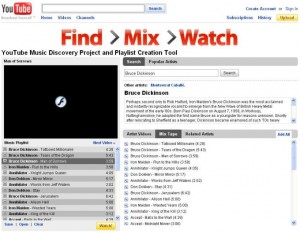
Youtube has created a new interface to its original one that meets the needs of people who used Youtube as some internetradio.

Make sure you don’t miss out on the “Mix Tape” tab.
It’s not only handy, but it gives you the opportunity to find some other awesome artists.

How to change the DNS servers in Ubuntu

You might want to change the DNS server if your ISP’s servers can sometimes be slow or outdated.

sudo gedit /etc/resolv.conf

and change or add the lines:

nameserver your_DNS1
nameserver your_DNS2

You can add as many lines like these, but two should be enough.
Test the used domain name servers careful!

#dns-nameserver 192.168.0.1
#dns-nameservers 192.168.0.1 192.168.0.2
#dns-search somedomain.org
#dns-domain 192.168.0.1

Edit: Serge’s comment (the first one) made me search a little bit.
After searching google it wasn’t totally clear if the DNS should be configured in resolv.cof or /etc/network/interfaces, so I took the GUI for a spin.
I’ve set up the DNS trough the GUI and checked the changes inside both locations.
The DNS servers I addes, became listed inside the /etc/resolv.conf file.
So after all, I was right.
But as the configuration file starts with the line #Generated by NetworkManager, I was wondering if these settings would get overwritten by the NetworkManager.
So I wiped all configured interfaces from my computer and let the NetworkManager try its evil.
It worked like a charm and just added the line ‘domain morraye.local’ to the file, without erasing my dns settings.
This was tested on Ubuntu 9.04 and Ubuntu 9.10.

You might also want to play with these settings in your resolv.conf file

# dns-domain 208.67.222.222
# dns-nameserver 208.67.222.222
# dns-nameservers 208.67.222.222 208.67.220.220
# dns-search wikipedia.org

Note: When you’re behind a router, you should change the dns server at your router (unless it uses pass-trough DNS lookups)

Bulk resizing and reformatting of pictures in an easy and fast way

I went to a BBQ yesterday and took some pictures with my cheap 10 Mpx camera.
This resulted in some nice pictures I’d like to share with friends. (not trough facebook, tough)
The problem of today’s Mpx-hype is that pictures are two to three times bigger than my computer screen.
A .JPG picture of Width: 3648 pixels and Height: 2736 pixels results in a 4.8MB file.
One night of pictures can take several Gigabytes.
The problem of this is when you want to upload them to the internet, or you want to mail them to some friends, they’ll take too much bandwidth or eat your download-limit.
When not using picasa, flickr or facebook or some sort of internet service that is.

So for resizing all the images to something more reasonable, we could use The Gimp with the batch function (included in the gimp-plugin-registry package)
But as these are a lot of large images this would simply take too long as each picture has to be opened/displayed.
Instead I recommend the ImageMagick (set of) program(s) to edit all the pictures at once.

Use the mogrify program to resize images and replace the originals. If you like, you can also change the format (extension) while doing so.
If this is the first time you play around with the ImageMagick programs, you might want to make a backup as you could damage your files irreversible.

Go to the directory where the pictures you want to resize are located.

cd ~/Pictures/TestPictures/
mogrify -resize 40% *.jpg

This will resize all files ending on .jpg to 40% of their original size. Note that the original files are replaced!

Now, if you want to convert all the .jpg files to .png’s as well, you can do this by using mogrify’s -format option like this:

mogrify -format png *.jpg

You can even do these two steps in one single command:

mogrify -resize 40% *.jpg | mogrify -format png *.jpg

So now you can relax and lay back till it’s done. :)

#!/usr/bin/pythonmo

One keyboard and mouse for multiple computers running Ubuntu

When you have multiple computers on your desk, it can be very annoying to switch keyboard an mouse each time you want to do something on one of the other computers.
So, you can solve this by just using one keyboard and one mouse for multiple computers without buying a hardware switch.
Synergy is a package, available from the repository that lets you share the mouse and keyboard over a range of different computers.
When synergy is active, your keystrokes will be send to the machine where your cursor is currently positioned.
The cursor will slide from screen to screen just as if you are working on one single system with multiple screens attached.
As far as I know, it’s not possible to drag windows from one machine to another. Which would be nice.
So if you’re a programmer and you’re still searching for a useful project, then this is just your bit.

Here is how you can easily start sharing your keyboard and mouse between different computers and screens using synergy on Ubuntu:

First off, install the synergy package and the QuickSynergy packages on each machine you want to use your pointer on with the command:

sudo apt-get install quicksynergy

Note that apt will install the synergy package as it’s required to run QuickSynergy. (QuickSynergy is in fact just a gui for Synergy)
When it’s installed, you’ll find QuickSynergy under the category ‘accessories’ in the application menu.

On the server:

The server is the computer where the used keyboard and mouse are attached to.
In the Share tab fill in the names of the computers where you want your keyboard and mouse to be operational.
Do not fill in the IP address, it won’t work.

Synergy server

To find out the name of your computer(s), open a terminal and type:

hostname

If all the hostnames are put in the right place, start the service by clicking ‘Execute’
Note that the window becomes gray.
You can now just minimize it and let it do it’s work.

On the client:

On the Client, fire up the QuickSynergy app and go to the Use tab.
Fill in the hostname of the server.
Note that you can also enter its IP, but know that when you’re using dynamic IP adresses, you’ll have to reconfigure this each time you fire up Synergy.

Synergy Client

Then just hit execute and minimize the window.
Now you can remove your keyboard and mouse from this computer.

When moving the mouse outside the window to the side you’ve configured the other computers position on the server, you’ll see your pointer go ‘troug’ the space between the two computers and appear on the other screen.
Als handy to know is that the clipboard is shared.
So you can actually copy something on machine 1 and paste it on machine 2. (text that is, don’t try this with data)

Note:
Synergy uses an unencrypted TCP/IP stream on port 24800. So if you’re on a network you can’t entirely trust, don’t use it unless you encrypt it.
I would even recommend ALL users using a wifi-network to encrypt the connection.
To Encrypt the Synergy data, you can simply follow the guide on their website.

The guys from Gentoo did it again!

Lots of hardcore hackers use Gentoo as their favourite distribution.
Mind to interpret hackers in the correct way!
This results in the a very strong technical support base, lots of nice tweaks and awesome hacks.
Sometimes the hacks they release are quite nuts.

What did you think of using the RAM on your Graphics card as swap space or RAM disk?
I wonder how this guy got this idea.
I cant think of a decent purpose for this.
Doesn’t matter… this hack is awesome!