I’m living without a TV these days and thus removed the set-top box, resulting in a clock-less living room.
Therefore, I’ve connected an old display to my ‘server’ (on the left of the screen) and created a new clock:
http://youtu.be/1jiE5jkDGV4
I’m living without a TV these days and thus removed the set-top box, resulting in a clock-less living room.
Therefore, I’ve connected an old display to my ‘server’ (on the left of the screen) and created a new clock:
http://youtu.be/1jiE5jkDGV4
Have you seen the “Juice Rap News” already? If no, you’ve been missing out.
If you have one or multiple boxes running somewhere at a remote location and you manage them trough ssh, you’re possibly familiar with the following situation.
It has been a long night.
On your desktop there are multiple terminals gaping in the dark.
During the whole night, some of these dark ships transported you to far remote playgrounds and back.
The other ones were mere destined for local hocus-pocus.
But it’s time to call it a day and go to bed.
You fire away the ‘poweroff’ command just to realize a fraction of a second later that this was the window to your homebrew webserver…
But it’s too late.
The connection is lost and the machine has no wake on lan…
Now you have to get out of your chair, find those damned pants and go all the way up to the attic to switch it back on.
No one likes this horrible situation. So Molly-guard is here to save the day.
Molly-guard is is a bunch of scripts that capture the halt, reboot, shutdown and poweroff commands and give you a second chance.
By checking if the tty has been created by sshd, it checks whether you’re logged on from a remote machine.
If that’s the case, molly asks you the hostname of the machine you want to shut down.
If the hostname you entered does not match the hostname where Molly is running on, you’re saved 🙂
You might think this is a silly tool, but after a long time of silence, I’m back to using my home server and just saw this screen:
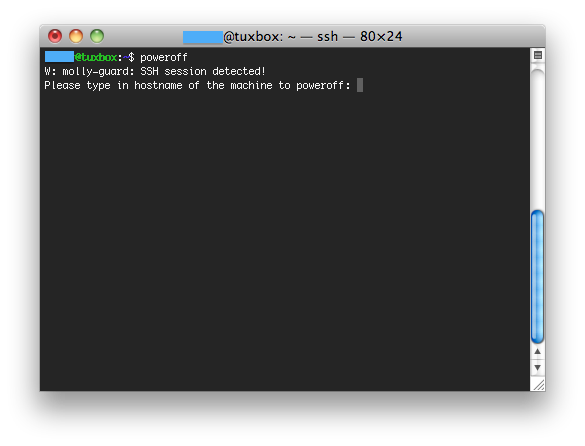
A little cool thing to know:
A shield to prevent tripping of some Big Red Switch by clumsy or ignorant hands. Originally used of the plexiglass covers improvised for the BRS on an IBM 4341 after a programmer’s toddler daughter (named Molly) frobbed it twice in one day. Later generalized to covers over stop/reset switches on disk drives and networking equipment. In hardware catalogues, you’ll see the much less interesting description “guarded button”.
— http://www.catb.org/~esr/jargon/html/M/molly-guard.html
Molly-guard man page from ubuntu: here
It’s here… The Pirate Party Ghent Blog!
If this is the first time you’ve read or heard about the ‘Pirate Party’, then you’ve missed out on some great international news.
So, time to get to the Wikiboats and loot yourself some knowledge!
The Pirate Party is a political party founded in Sweden by Rickard Falkvinge in 2006 and has been founded in at least 40 countries ever since.
The red line throughout their program’s are support for civil rights, direct democracy and participation, reform of copyright and patent law, free sharing of knowledge (Open Content), data privacy, transparency, freedom of information, free education and universal healthcare.
Above that, it’s the only political party that has spread over country-borders.
Check out the Pirate Party International if you want to learn more about that.
But I started out with the cool news about the Pirate Party Ghent Crew’s Blog, so let’s get back to this specific part of the Pirate Party Belgium.
So yes, there is a Pirate Party in my country, even better, in my city 🙂
There is a weekly awesome meeting from the Pirate Party Ghent Crew.
I fully understand that now you know, you’re eager to know what’s happening there…
On the Pirate Party Ghent Wiki page, you’ll find the meetingnotes of all past meetings, aswell as the agenda for future meetings.
Are you living in Belgium, and want to find out if there is a Crew around, find out at the main Pirateparty Belgium Wiki, or start your own 😉
When done correctly, “Secure Boot” is designed to protect against malware by preventing computers from loading unauthorized binary programs when booting. In practice, this means that computers implementing it won’t boot unauthorized operating systems — including initially authorized systems that have been modified without being re-approved.
The biggest issue with the “Secure Boot” system, is that it’ll create a vendor-lockin. This has been seen with the android system as well, but it’ll be Microsft pulling the strings on this one.
Some other interesting reads on Secure Boot:
Well, this is part 2 of a series of time wasting websites I started here.
 In what year will the earth seize to exist? – Pick a date.
You know them, the movies and books about the end of time…
But do you know all references? This website lists them out for you so you can just pick a date as you please 🙂
http://web.me.com/lorenmadsen/endings/pick_a_year.html
 Play Rock-Paper-Scissors against AI
Ever wondered how good you are in the game rock-paper-scissors?
Test your skills and go against a well trained computer-bot (Artificial Intelligence)
http://www.nytimes.com/interactive/science/rock-paper-scissors.html

Barbie has always been the perfect blonde… Or that’s what the company wanted you to believe.
Here are the unseen and uncensored pictures of this young blonde girl gone wrong. Well I wonder how much hit’s I get on this previous sentence. 🙂
http://www.flickr.com/photos/marielclayton/
 Do nothing for 2 minutes
Would you want/need to spend 2 minutes doing nothing?
This site can be used as a relaxing tool to help you succeed doing absolutely nothing.
http://www.donothingfor2minutes.com/
 Stuff On My Cat
A website full of images from cats with stuff on them.
No, not a cheeseburger…
Be careful… there are quite a lot of times you can press “next”.
http://youtu.be/8UouP8cRYZ8
Although I think this clip is wonderful, I would like quite a lot of people to stay on Facebook… That’ll keep the internet cleaner I guess.
We all know how easy it is to lose track of time while surfing the awesome internet.
During the last months, I’ve been bookmarking some of the most useless sites that I came across. (Without a reason at that time)
Now I have this folder full of time-wasting websites sitting in my toolbar and wondered whether to delete it or keep it…
So I came up with the brilliant idea of putting the list up here for later referral whilst sharing it with you 🙂 That’s double karma!
Here we go.
 Uncomfotable Moments With Putin
Although I think there could be wound up a lot more of pictures, it’s already an awesome concept.
http://uncomfortablemomentswithputin.tumblr.com/
 What’s Osama Bin Watchin’?
On this page you can enter any youtube video and make Osama Bin Laden watch it.
You can make the old man watch Justin Bieber for over a few hours if you’d like 🙂
http://www.tomscott.com/osama/
 Kim Jong-Il looking at things
No need to explain the content of this page.
It’s better populated than the Putin page and has a higher rofl count.
http://kimjongillookingatthings.tumblr.com/
 Your Mom Was Hot
Have you ever seen the hot-or-not page’s? Well, this is like one of them, but with an extra requirement…
Was your Mom hot? Or your kid’s mom, or your grandmom, or your friend’s mom, etc…Click submit to send us a photo because let’s face it, before your Mom was just your Mom… Your Mom Was Hot!
 Just Add Balls
Not sure whether I should call this funny or 200% wasted time… But anyhow, the title itself made me lol at least a bit.
Everything is better with balls in it!
http://justaddballs.tumblr.com/
Those were the first five links,
keep an eye open for the upcoming stuff.
If you have some awesome time wasting links yourself, share them in the comment section.
Yesterday there was this documentary on the state of the internet, privacy and security (in Belgium).
The idea was based on David Bond‘s movie/experiment “Erasing David“.
Dirk Leestmans (journalist) hired a private security audit and asked him to hack Freek Braeckman‘s computer and bank account within the next three days.
Dirk also goes deeper on the different used technologies applied by the Belgian Police force to track people.
Watch the video: